The Permission Model Myth
Translated by Claude from the Chinese original.
Basic Concepts
Depending on context, “permission” can mean different things. This article focuses on authorization in computing. Related concepts include:
- Authentication (AuthN): The process of confirming the identity of a person or entity. In computer security, this typically involves verifying whether a user or system is truly who it claims to be. Authentication can be performed through various methods, including passwords, biometrics, smart cards, or digital certificates. Authentication is the first step in the access control process—only after successful identity verification will the system consider granting access permissions. Related technical protocols and frameworks include OAuth, OpenID, and SAML.
- Authorization (AuthZ): After a user’s identity has been verified, the system needs to decide which resources the user can access and what operations they can perform. Authorization is the process of defining and managing access permissions, determining what data or resources a verified user can view, use, modify, or delete. Its goal is to ensure that only users with appropriate permissions can access specific resources or data. Related authorization models include Role-Based Access Control (RBAC), Attribute-Based Access Control (ABAC), and others.
- Access Control: A broader concept that encompasses both authentication and authorization. It refers to the various methods and technologies used to restrict access to and use of systems and data.
Use Cases
Below are some access-control scenarios commonly encountered in engineering work.
File System Permissions

The drwx------ in the image is the mode string for a file-system entry. The first character indicates the file type (- for regular files, d for directories), followed by three groups of three characters representing read, write, and execute permissions for owner, group, and others. Some entries also include @ or +. @ means the file or directory has extended attributes (not discussed here). + means an Access Control List (ACL) is present. ACLs provide finer-grained rules beyond standard rwx bits, with per-user/per-group configuration. Using ls -le, we can inspect these ACL entries:

For more details, see man chmod. Two observations:
- Unix permission granularity is too coarse, only supporting read, write, and execute—three types of operations. Other operating systems chose to add additional ACL mechanisms as a patch.
- macOS ACL rule format is a triplet of:
(user, allow/deny, operation).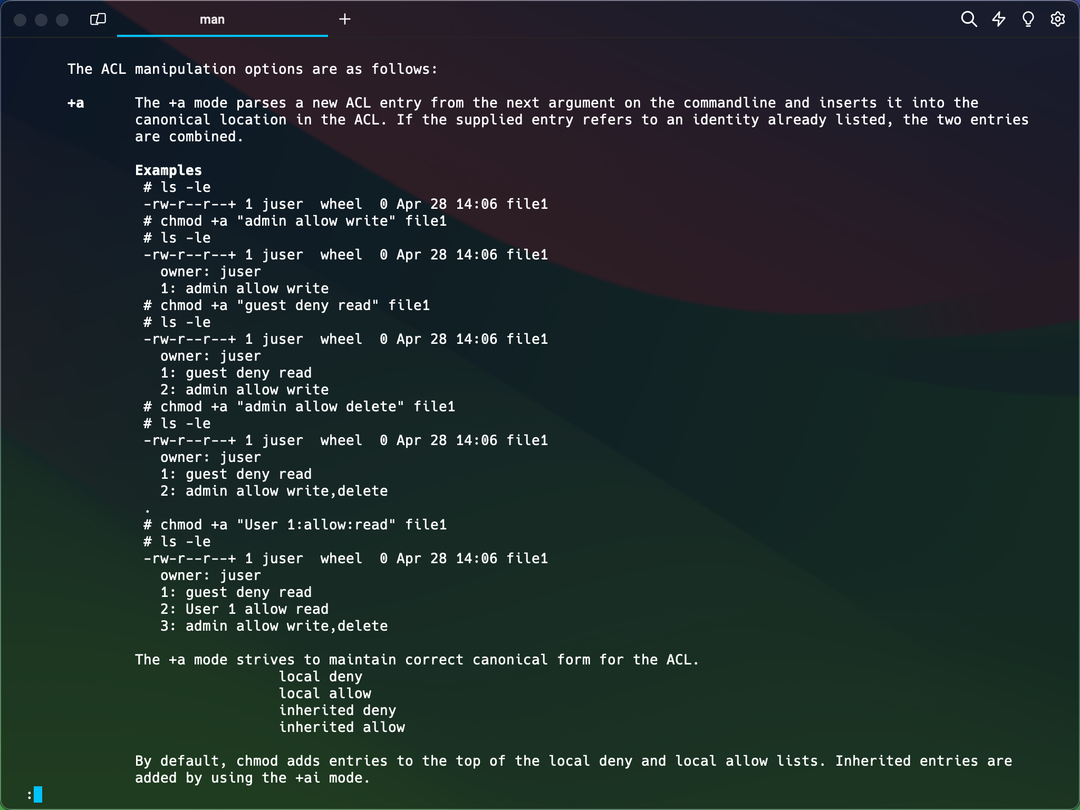

Database Permissions
Database systems provide permissions (and permission combinations), allowing administrators to grant and audit access for users or user groups.
The screenshots below show one example of granting and inspecting permissions:


From the examples above, we also observe:
- MySQL authorization operates at multiple levels—a user can have global permissions and table-level permissions.
- MySQL’s permission control also follows the
(user, allow/deny, operation)triplet pattern.
Access Control Models
Several commonly used access control models exist in the industry: Discretionary Access Control (DAC), Mandatory Access Control (MAC), Role-Based Access Control (RBAC), Attribute-Based Access Control (ABAC), and Policy-Based Access Control (PBAC).
Note: While these access control models represent a general consensus, there is currently no unified industry standard for determining which access control model a real-world solution belongs to. Therefore, the descriptions below serve mainly as conceptual explanations rather than definitive definitions and distinctions.
DAC
DAC is the most basic access control model, allowing resource owners to control access to their resources. In the DAC model, users can assign access permissions to other users based on their own judgment.
The file system permissions and database permissions examples above are actually DAC systems—they directly specify “who can perform what operations,” such as the file system’s User 1 allow read and the database’s GRANT SELECT ON lark.message TO 'admin'@'%';.
RBAC
RBAC is an access control model based on user roles. It allows system administrators to assign users to different roles according to organizational functions and responsibilities, with each role having a set of predefined access permissions. RBAC simplifies permission management because administrators only need to manage the relationship between roles and permissions, rather than each user’s individual permissions.
The following article describes how to configure RBAC in SAP:
SAP Commissions - Implementing Authorization With User Roles (RBAC)
In many RBAC implementations, user groups (or roles) bind users to predefined permissions.

RBAC has the advantages of simplified management and flexible configuration, but in practice it also exhibits the following drawbacks:
- Role explosion: In complex organizations, a large number of roles may need to be created to cover all access requirements, which can make role management complex and difficult to maintain.
- Complex initial setup: Correctly implementing an RBAC system may require significant upfront planning and configuration, especially when migrating existing permissions to the RBAC model.
- Limited flexibility: While RBAC improves permission management efficiency, in some cases it may limit flexibility for individual users’ specific needs.
- Performance issues: In large systems with many users, roles, and permission rules, permission checks may cause performance problems.
- Management challenges: As organizations grow, managing and updating roles and their permissions can become complex, especially without automated tooling support.
ABAC
ABAC is a more flexible and dynamic access control model that determines access permissions based on attributes of the requester (such as age, position, etc.), resource attributes, and environmental conditions (such as time). ABAC provides more fine-grained access control, supports more complex security policies, and is suitable for scenarios requiring highly customized access control.
The main advantage of ABAC over RBAC is flexibility at the individual record level. RBAC grants are group-based, so members in one group usually share permissions. In a healthcare system, if each nurse should only see records for assigned patients, pure RBAC may require one role/group per nurse. With ABAC, one rule like record.assignedNurse == currentUser can express this directly.
A common pattern is hybrid: use RBAC to assign rule sets to users, then use ABAC within those rules to evaluate user/resource/environment attributes for the final decision.
Real-World Case Study
https://www.youtube.com/watch?v=ZUmzELJ2UcM&list=PLnobS_RgN7JZxK1wjUvQ84jMFqRZoJXbD&index=1

The video demonstrates 4 types of access control:
- IP and login time determine whether a user can access the organization.
- User permission groups determine whether a user can access objects.
- Roles and reporting lines determine whether a user can access specific records.
- User permission groups determine whether a user can access specific fields on a record.
We can see that different access control models exist at different levels of the system, which is one of the key challenges in abstracting permission systems.
Industry Solutions
Many early solutions did not clearly separate authentication (AuthN) from authorization (AuthZ). In my observation, RBAC is often the first-class model in these frameworks: once identity is user-centric, downstream authorization also tends to be user-centric.
- Spring Security: No control panel; provides various APIs but doesn’t support configuration files.
- Apache Shiro: No control panel; supports configuration files but doesn’t support ABAC.
The above two solutions and other earlier open-source solutions have relatively simple support for access control models and are therefore outside the scope of this article. In recent years, two solutions have provided more comprehensive support for access control models:
- Casbin: Open source, positioned as an SDK, supports various access control models, integrates with existing systems, and defines permissions through configuration.
- Zanzibar: Closed source, positioned as an authorization service, also supports various access control models with finer control granularity, and permissions are configured through API calls.
Casbin
Here’s an example of creating RBAC with Casbin.
Model file:
[request_definition]
r = sub, act, obj

[policy_definition]
p = sub, act, obj

[role_definition]
g = _, _
g2 = _, _

[policy_effect]
e = some(where (p.eft == allow))

[matchers]
m = r.sub == p.sub && g(p.act, r.act) && g2(p.obj, r.obj)
Policy file:
p, alice, sub-reader, sub1
p, bob, rg-owner, rg2

// subscription role to subscription action mapping
g, sub-reader, sub-read
g, sub-owner, sub-read
g, sub-owner, sub-write

// resourceGroup role to resourceGroup action mapping
g, rg-reader, rg-read
g, rg-owner, rg-read
g, rg-owner, rg-write

// subscription role to resourceGroup role mapping
g, sub-reader, rg-reader
g, sub-owner, rg-owner

// subscription resource to resourceGroup resource mapping
g2, sub1, rg1
g2, sub2, rg2
Request: alice, rg-read, rg1 -> true.
Reasoning flow: first match the subject. Alice’s policy entry is alice, sub-reader, sub1.

rg-read, while Alice’s role is sub-reader. Through g, sub-reader, rg-reader and g, rg-reader, rg-read, we infer that sub-reader implies rg-read.

rg1, and Alice’s mapped resource is sub1; g2, sub1, rg1 links the two.

Zanzibar
This article skips the detailed introduction of Zanzibar. The following URL provides a comprehensive introduction:
Zanzibar: A Global Authorization System - Presented by Auth0
One key difference is architecture: Zanzibar is a standalone service, while Casbin is an SDK. A standalone service needs its own relationship-data storage plus caching and consistency management. Zanzibar is generally more full-featured, but that also implies higher operational cost and potentially tougher integration than an embedded SDK.
The Challenge of Abstraction
Permission systems do not have a universal standard like TCP/IP, mainly because requirements and implementations vary widely across domains. TCP/IP provides a common interoperability layer for networks, while authorization systems are deeply coupled to business logic, organizational structures, and security constraints that differ by product. Key reasons include:
- Diverse business requirements: Different types of applications have different business models and security needs. For example, a financial industry permission management system needs to consider complex compliance and audit requirements, while a social media platform’s permission system may focus more on user privacy and content management. This diversity makes it difficult to establish a unified standard covering all scenarios.
- Organizational structure differences: Different organizations’ structures, policies, and management processes also affect permission management implementation. Large enterprises may need a complex role hierarchy and fine-grained permission control, while small teams may only need a simple permission model.
- Rapid technological development: The rapid advancement of IT technology (including software development frameworks, database technology, cloud services, etc.) means new permission management methods and tools are constantly emerging, making it difficult to maintain a long-term effective unified standard.
- Balancing security and flexibility: Permission systems need to find a balance between security and flexibility. Different application scenarios may prioritize these two aspects differently, leading to different permission management strategies.
- Difficulty of standardization: Although some permission management concepts (such as RBAC) are widely accepted and used, extending these concepts to a universal standard covering all possible use cases is extremely difficult. Attempting to create such a standard could result in something overly complex and unwieldy, unable to adapt to rapidly changing technology and business requirements.
Therefore, while some degree of standardization is possible in certain areas (such as authentication and encryption technology), the specific implementation of permission management systems often needs to be customized based on specific application scenarios and requirements.
Extension: Zero Trust Network Model
Zero Trust leans more toward identity verification (AuthN), but many of its principles are closely related to AuthZ design. So this article ends with a brief Zero Trust overview.
Zero Trust is a cybersecurity model whose core principle is “never trust, always verify.” This model requires strict identity verification for all users and devices attempting to access network resources, regardless of whether they are inside or outside the network. The Zero Trust model’s starting point is to no longer assume the internal network is safe, but instead to consider that threats can come from anywhere, and therefore every access request needs to be verified and authorized.
The core principles of the Zero Trust model include:
- Principle of least privilege: Users and devices receive only the minimum permissions needed to complete their tasks, limiting access to sensitive information and systems.
- Continuous verification: The system continuously monitors and verifies the trust status of users and devices, never assuming they are secure at any point.
- Explicit verification: All access attempts must undergo authentication and authorization, regardless of user or device location.
- Multi-factor authentication (MFA): Adding security layers by requiring two or more identity-proving factors to reduce the risk of password compromise.
- Micro-segmentation: Dividing the network into small, managed segments to reduce the potential attacker’s range of movement and limit access to sensitive data.
- Risk-based adaptive policies: Dynamically adjusting access control policies based on factors such as user behavior, device security status, access time, and location.